Closed beta — invite only
Put every brick back in its bag.
BrickBagger walks a pile of loose LEGO back into the original numbered bags — bag by bag, page by page, on the phone at your sorting table. It tracks what you have found, what is missing, and what the finished set is worth.

The problem
Reverse engineer your collection.
A complete set in its bags is worth more than the same bricks in a tub.
Sorting one back by hand means holding an instruction booklet in one hand and a pile in the other, for hours.
And you don't find out what's missing until you're nearly finished.
How it works
From a pile on the table to a set you can build.
Add your sets.
Search the local catalogue and every set arrives with its full part inventory — every piece, every colour, every minifig.
Say which pages belong to which bag.
Or inherit a plan another user has already worked out for that set, and your own declarations feed back in for the next person.
Sort and bag.
Tick pieces off page by page. Every bag and every page carries a colour-coded status chip showing exactly how far through it you are.
Missing pieces roll up on their own.
Across every set in your library, not just the one you are working on.
Features
Everything the sort actually needs.
Built for the sorting table
A phone-first shell with bottom navigation and a sort screen designed for one hand at a table covered in bricks. No app to install — it runs in the browser.
Bag-and-page tracking
Three tabs on every bag — Bag contents, Sort & bag, Plan bag — with five-state colour coding on every bag and every page.
Community bag plans
Inherit a set’s bag plan from someone who has already worked it out, and your own declarations feed back in. Coverage is crowd-sourced, so it varies by set.
Parts finder
Every piece in your library in one view, filtered by colour, theme, set or category. Place a piece you are holding into a bag, with an exact undo.
My Minifigs
Every minifig across the collection, with per-set progress and jump links into the sort flow. A read-only overview of where each figure stands.
Missing-parts tracking
Flag a piece missing, find it later, and it resolves back to the bag it belongs in — wherever in your library it turns up.
AI piece scanner
Photograph a piece and it is matched against the pieces you have flagged missing, using your phone camera.
Resale pricing
BrickLink price guide for sets and minifigs, Brickset RRP, and a verdict on whether a set is worth more whole or parted out as figures.
Retirement status
Know which of your sets are out of production, sourced from Brickset rather than guessed.
Printable checklist
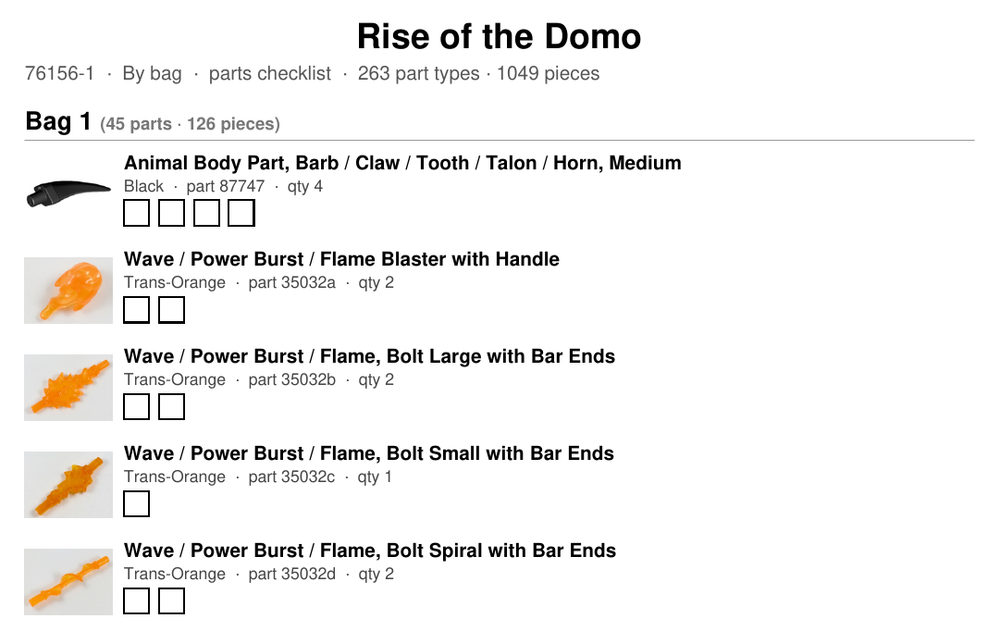
Print a set’s checklist as a PDF — all parts in one list, or by bag or instruction page where the set has that data. A tick box per piece, a write-in line past fifty, and colour names in words for black-and-white printing.

Every piece you own, in one list.
The Parts finder covers your whole library at once — five scopes over every piece, filtered by colour, theme, set or category.

Value
What it's worth, and what it's done.
Prices are collected nightly into an append-only ledger, so your collection builds a history rather than just showing a number. It starts recording from the day you join: value over time, what has moved recently, and what you paid against what it is worth now — including whether a set is still sealed.
How this is different
There are free sites that print a static map of which part belongs in which bag. BrickBagger isn't one of them. The map is where it starts: what it actually does is track your progress, your missing pieces and your collection's value as you work.
Pricing
Free during the beta.
BrickBagger is free while the beta is running. A Pro tier is planned for after the beta closes. There is no billing today and no card required.
Request an inviteFAQ
Questions worth asking.
Is this affiliated with the LEGO Group?
No.
Where does the data come from?
Rebrickable for the catalogue, BrickLink for market prices, and Brickset for RRP and retirement status.
What currency are prices in?
Market prices are collected in Australian dollars and shown in whichever of 30 currencies you choose in Settings, converted at European Central Bank reference rates. That is presentation only — nothing you have recorded changes. Manufacturer's RRP is the exception and stays in its own market's currency: a US recommended price is a fact about the US market, not a figure to convert.
Do I need my own BrickLink account?
For price refreshes, yes. You add your own BrickLink API credentials in Settings, and they are only ever used for your own library.
Is there a phone app?
Nothing to install — it runs in the browser. The phone experience is built deliberately: sorting happens at a table covered in bricks and the scanner uses your phone camera, so the phone is the primary device, not an afterthought.
Can I sort away from a screen?
Yes — print a checklist for any set and tick it off with a pen. Pick all parts in one list, or grouped by bag or by instruction page, on A4 or Letter. It doesn’t sync back; it’s paper.
How do I get in?
It is invite-only during the beta. Ask for one and, if your request is approved, your invite code arrives by email.
Request an invite